

一、前言
为了提高服务的可用性,我们一般会将相同的服务部署多个实例,负载均衡的作用就是使获取服务的请求被均衡的分配到各个实例中。负载均衡一般分为服务端负载均衡和客户端负载均衡,服务端的负载均衡通过硬件(如F5)或者软件(如Nginx)来实现,而Ribbon实现的是客户端负载均衡。服务端负载均衡是在硬件设备或者软件模块中维护一份可用服务清单,然后客户端发送服务请求到这些负载均衡的设备上,这些设备根据一些算法均衡的将请求转发出去。而客户端负载均衡则是客户端自己从服务注册中心(如之前提到的Eureka Server)中获取服务清单缓存到本地,然后通过Ribbon内部算法均衡的去访问这些服务。
二、Ribbon简介
Ribbon是由Netflix开发的一款基于HTTP和TCP的负载均衡的开源软件。我们可以直接给Ribbon配置好服务列表清单,也可以配合Eureka主动的去获取服务清单,需要使用到这些服务的时候Ribbon通过轮询或者随机等均衡算法去获取服务。
Spring Cloud Ribbon 是基于 Netflix Ribbon 实现的一套客户端负载均衡工具,其主要功能是提供客户端的软件负载均衡算法,将 Netflix 的中间层服务连接在一起。
其运行原理如下图: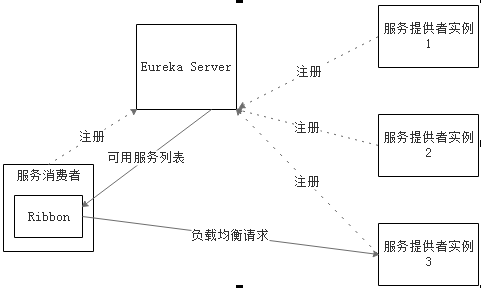
Ribbon 运行时分成 2 个步骤:
1>先选择在同一个区域负载较少的 EurekaServer;
2>再根据用户指定的策略,在从 EurekaServer 中获取注册列表中的服务信息进行调用。
其中,Ribbon 提供多种负载均衡策略:如轮询、随机、响应时间加权等。
三、实战演练
我们在 common-api,user-web 项目的基础上进行修改。不清楚的读者请先转移至 《Spring Cloud Eureka服务治理》 进行浏览。
3.1 common-api改造
3.1.1 增加依赖
1 | <dependency> |
3.1.1 RestConfiguration改造
1 | @Configuration |
这里使用的是随机(RandomRule)规则。
3.2 user-server改造
这里我们增加两个user-server,新增application-userserver01.yml,application-userserver02.yml
3.2.1 application-xxx.yml
application-userserver01.yml
1 | server: |
application-userserver02.yml
1 | server: |
3.2.2 新增启动服务
新增两个服务
| 服务名 | 启动参数 | 端口 |
|---|---|---|
| UserServerApplication-userserver01-8788 | spring.profiles.active=userserver01 | 8788 |
| UserServerApplication-userserver02-8789 | spring.profiles.active=userserver02 | 8789 |
3.2.3 修改UserServiceImpl
修改UserServiceImpl.java,将返回的User对应的姓名设置为对应的服务实例ID。
1 | @Service |
3.2.4 启动服务
浏览器访问 Eureka 监管界面,查看 Eureka 服务监控界面,如下图: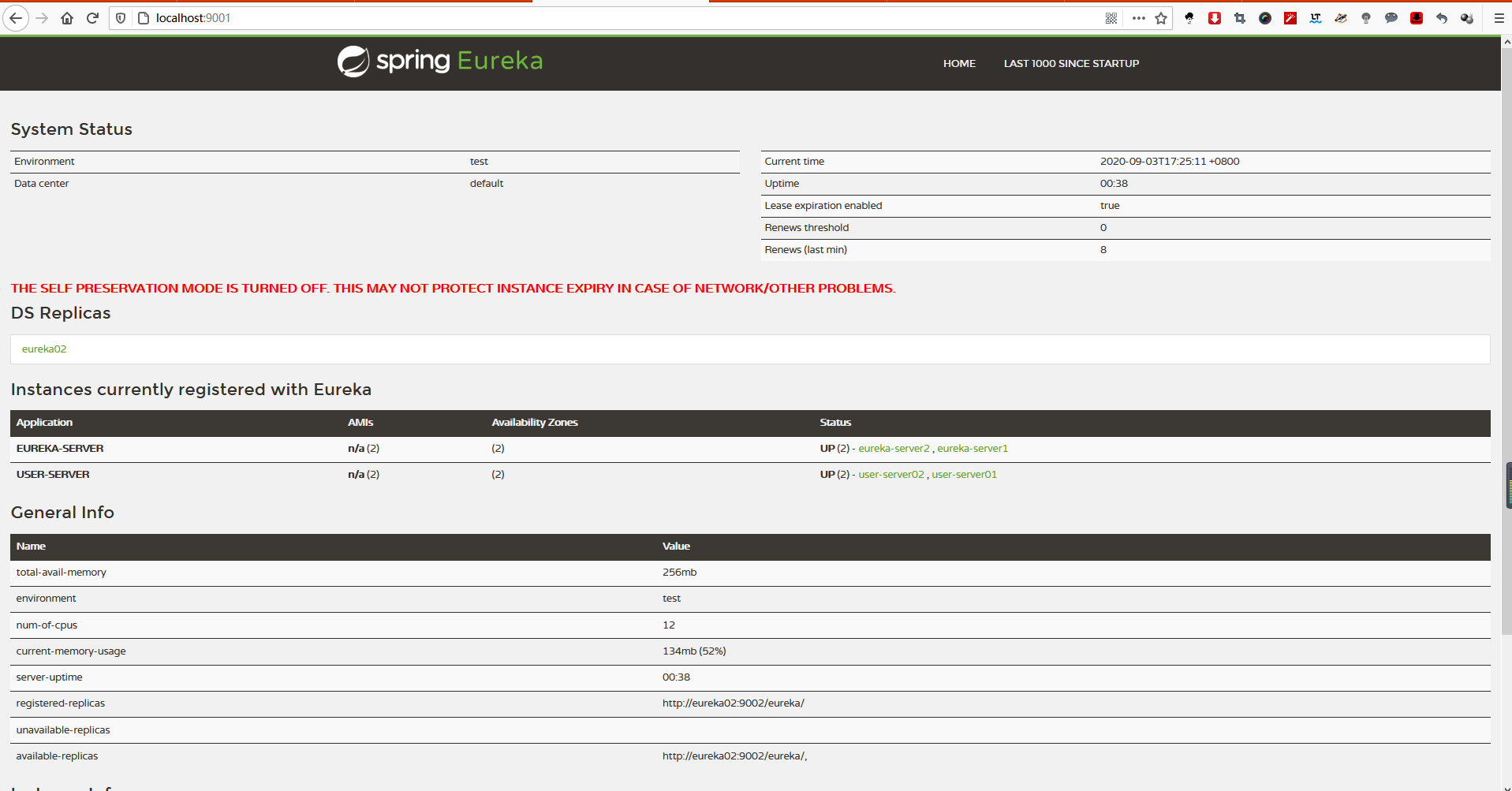
3.3 user-web改造
3.3.1 新增请求
在UserController里面新增以下请求
1 | @RequestMapping("getUser/{id}") |
3.4 测试
访问user-web: http://localhost:8765/user/getUser/2
结果如下: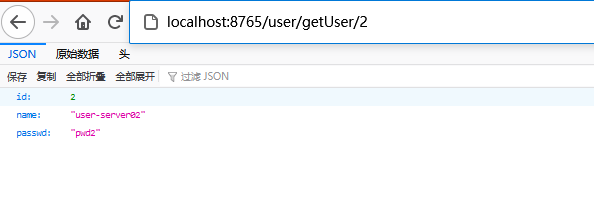
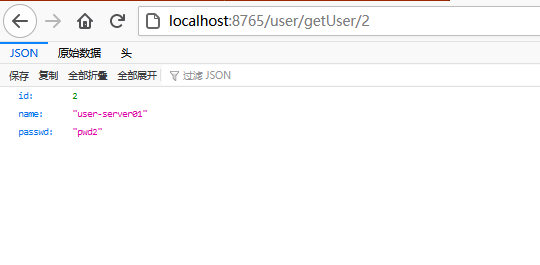
四、负载均衡策略
Ribbon 提供 IRule 接口,该接口定义了如何访问服务的策略,以下是该接口的实现类:
| 策略 | 解释 |
|---|---|
| RoundRobinRule | 轮询,默认使用的规则 |
| RandomRule | 随机 |
| AvailabilityFilteringRule | 先过滤由于多次访问故障而处于断路器跳闸状态以及并发连接数量超过阀值得服务,然后从剩余服务列表中按照轮询策略进行访问 |
| WeightedResponseTimeRule | 根据平均响应时间计算所有的权重,响应时间越快服务权重越有可能被选中 |
| RetryRule | 先按照 RoundRobinRule 策略获取服务,如果获取服务失败则在指定时间内进行重试,获取可用服务 |
| BestAvailableRule | 先过滤由于多次访问故障而处于断路器跳闸状态的服务,然后选择并发量最小的服务 |
| ZoneAvoidanceRule | 判断 server 所在区域的性能和 server 的可用性来选择服务器。 |
五、RestTemplate详解
从名称上来看就可以知道它是一个用来发送REST请求的摸板,所以包含了GET,POST,PUT,DELETE等HTTP Method对应的方法。
5.1 发送Get请求
RestTemplate中与GET请求对应的方法有getForEntity和getForObject。
5.1.1 getForEntity
getForEntity方法返回ResponseEntity对象,该对象包含了返回报文头,报文体和状态码等信息。getForEntity有三个重载方法
getForEntity(String url, Class<T> responseType, Object... uriVariables);
getForEntity(String url, Class<T> responseType, Map<String, ?> uriVariables);
getForEntity(URI url, Class<T> responseType);
第一个参数为Url,第二个参数为返回值的类型,第三个参数为请求的参数(可以是数组,也可以是Map)。
举个getForEntity(String url, Class
1 | @GetMapping("user/{id:\\d+}") |
{1}为参数的占位符,匹配参数数组的第一个元素。因为第二个参数指定了类型为User,所以调用getBody方法返回类型也为User。
方法参数除了可以放在数组里外,也可以放在Map里,举个getForEntity(String url, Class
1 | @GetMapping("user/{id:\\d+}") |
只有两个参数的重载方法getForEntity(URI url, Class
1 | @GetMapping("user/{id:\\d+}") |
其中expand方法也可以接收数组和Map两种类型的参数。
5.1.2 getForObject
getForObject方法和getForEntity方法类似,getForObject方法相当于getForEntity方法调用了getBody方法,直接返回结果对象,为不是ResponseEntity对象。
getForObject方法和getForEntity方法一样,也有三个重载方法,参数类型和getForEntity方法一致,所以不再列出。
5.2 发送POST请求
使用RestTemplate发送POST请求主要有三个方法。
postForEntity
postForObject
postForLocation
postForEntity和postForObject也分别有三个重载方法,方法参数和使用方式和上面介绍的getForEntity和getForObject一样,所以不再详细介绍。简单举个getForObject的使用例子:
1 | @GetMapping("user") |
5.3 发送PUT请求
使用RestTemplate发送PUT请求,使用的是它的put方法,put方法返回值是void类型,该方法也有三个重载方法:
put(String url, Object request, Object... uriVariables)
put(String url, Object request, Map<String, ?> uriVariables)
put(URI url, Object request)
举个例子:
1 | @GetMapping("user/update") |
在RESTful风格的接口中,判断成功失败不再是通过返回值的某个标识来判断的,而是通过返回报文的状态码是否为200来判断。当这个方法成功执行并返回时,返回报文状态为200,即可判断方法执行成功。
5.4 发送DELETE请求
使用RestTemplate发送DELETE请求,使用的是它的delete方法,delete方法返回值是void类型,该方法也有三个重载方法:
delete(String url, Object... uriVariables)
delete(String url, Map<String, ?> uriVariables)
delete(URI url)
举个例子:
1 | @GetMapping("user/delete/{id:\\d+}") |