Spring Boot支持FreeMarker、Groovy、Thymeleaf和Mustache四种模板解析引擎,官方推荐使用Thymeleaf。
一、spring-boot-starter-thymeleaf
在Spring Boot中使用Thymeleaf只需在pom中加入Thymeleaf的starter即可:
1
2
3
4
| <dependency>
<groupId>org.springframework.boot</groupId>
<artifactId>spring-boot-starter-thymeleaf</artifactId>
</dependency>
|
在Spring Boot中,默认的html页面地址为src/main/resources/templates,默认的静态资源地址为src/main/resources/static。
二、Thymeleaf默认配置
在Spring Boot配置文件中可对Thymeleaf的默认配置进行修改:
1
2
3
4
5
6
7
| spring:
thymeleaf:
cache: false #开启模板缓存(默认值:true)
mode: HTML5 #要运用于模板之上的模板模式。另见StandardTemplate-ModeHandlers(默认值:HTML5)
encoding: UTF-8 #模板编码
prefix: classpath:/templates/ #在构建URL时添加到视图名称前的前缀(默认值:classpath:/templates/),多个位置用逗号隔开
suffix: .html #在构建URL时添加到视图名称后的后缀(默认值:.html)
|
一般开发中将spring.thymeleaf.cache设置为false,其他保持默认值即可。
三、简单示例
编写一个简单的Controller:
1
2
3
4
5
6
7
8
9
10
11
12
13
| @Controller
public class IndexController {
@RequestMapping("/account")
public String index(Model m) {
List<Account> list = new ArrayList<Account>();
list.add(new Account(1,"KangKang", "康康", "e10adc3949ba59abbe56e", "超级管理员", "17777777777"));
list.add(new Account(2,"Mike", "麦克", "e10adc3949ba59abbe56e", "管理员", "13444444444"));
list.add(new Account(3,"Jane","简","e10adc3949ba59abbe56e","运维人员","18666666666"));
list.add(new Account(4,"Maria", "玛利亚", "e10adc3949ba59abbe56e", "清算人员", "19999999999"));
m.addAttribute("accountList",list);
return "account";
}
}
|
编写account.html页面:
1
2
3
4
5
6
7
8
9
10
11
12
13
14
15
16
17
18
19
20
21
22
23
24
25
26
27
| <!DOCTYPE html>
<html xmlns:th="http://www.thymeleaf.org">
<head>
<title>account</title>
<meta http-equiv="Content-Type" content="text/html; charset=UTF-8" />
<link rel="stylesheet" th:href="@{/css/style.css}" type="text/css">
</head>
<body>
<table>
<tr>
<th>no</th>
<th>account</th>
<th>name</th>
<th>password</th>
<th>accountType</th>
<th>tel</th>
</tr>
<tr th:each="list,stat : ${accountList}">
<td th:text="${stat.count}"></td>
<td th:text="${list.account}"></td>
<td th:text="${list.name}"></td>
<td th:text="${list.password}"></td>
<td th:text="${list.accountType}"></td>
<td th:text="${list.tel}"></td>
</tr>
</table>
</body>
|
编写style.css页面:
1
2
3
4
5
6
7
8
9
10
11
12
13
14
15
16
17
18
19
20
21
22
23
24
25
26
27
28
29
30
31
| table {
margin: 20px 40px 20px 0px;
width: 100%;
border-collapse: collapse;
border-spacing: 0;
table-layout: automatic;
word-wrap: break-all
}
table>tbody>tr:nth-of-type(odd) {
background-color: #F7F7F7
}
th, td {
padding: 8px;
text-align: left;
vertical-align: middle;
font-weight: normal;
font-size: 12px;
border-bottom: 1px solid #fff;
}
th {
padding-bottom: 10px;
color: #fff;
font-weight: 700;
background: rgba(66, 100, 131, .9)
}
td {
border-bottom-width: 1px
}
|
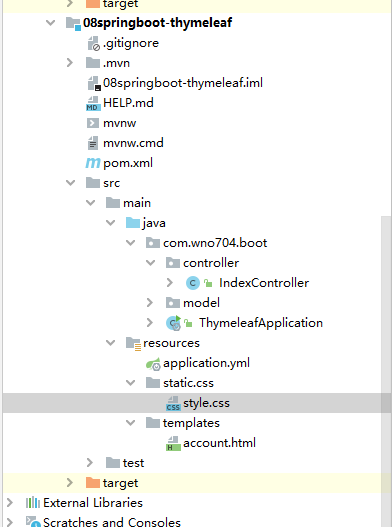
最终项目目录如下所示:
![]()
启动项目,访问 http://localhost:8080/web/account
![]()